
/PREPARE to build your SELF-SERVICE FLOW
Initial site content
So we know that once your client chooses a template, a site will get created for them behind the scenes and they’re eventually going to be dropped into the editor. The next question to ask is:
Where is the initial content for the site going to come from?
Here you want to think about the experience you want to provide your client when they first enter their site.
Duda’s platform offers flexibility here — you could:
- Dynamically populate fields in the template using basic business information you have in your CRM or databases and let your client manually edit the rest
- Add a form into the site creation flow so the client can supply more details about their business before the site gets created. This form could collect information like their logo, tagline, maybe “about us” text, maybe a list of their services or business hours, images they know they’ll want to use in their site, etc. This information can then be pushed directly into their site.
- A combination of the 2 options above
- Decide you’re not going to push any content into the site and let your client start with the placeholder copy that came with the template
Again, lots of flexibility here!
Demo: dynamically populate content from a CRM
To illustrate that first option, let’s say you have a CRM that contains your client’s business information: their business name, their address, their phone number, email address, etc. Each site within your Duda account will have its own unique content library where text and media can be stored.
Using Duda’s API, you can pull that information from your CRM and dynamically push that information into the site’s content library so it’s available when your client enters the site for the first time.
Watch this video from our
"Push Content" course to learn more about how this works:
Having portions of the site pre-populated for your clients can be a solid time saver—not to mention the added 'wow' factor!
Adding a content collection form (aka: user intake form)
If you decide you’re going to want to add an intake form as a part of the process, your new flow may look something like this:
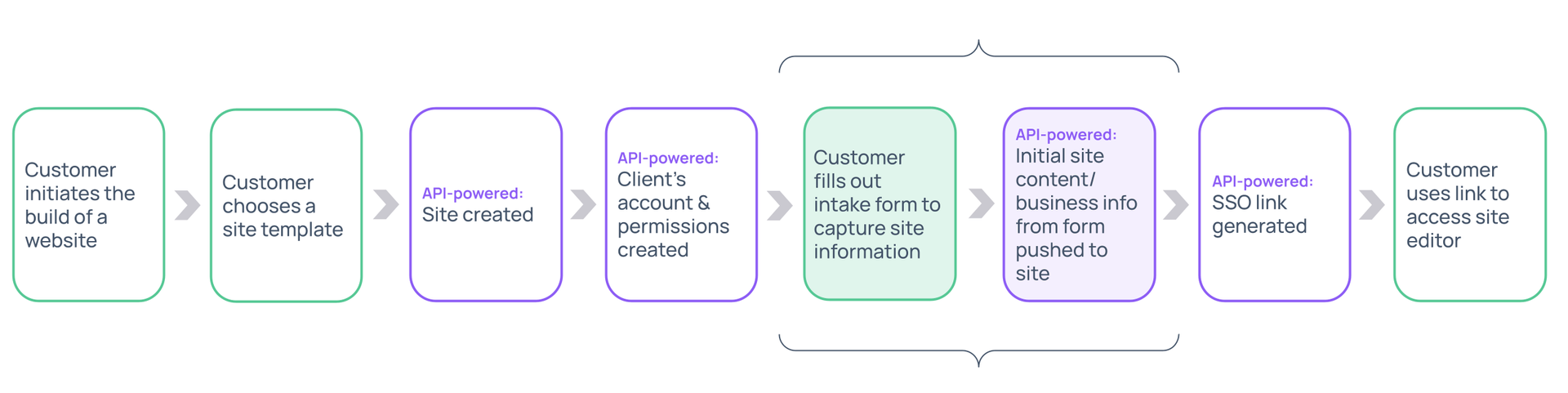
Using an intake form can be a really great experience for your client as it gives them a running start on their site’s development. With Duda’s technology, not only can you have all the text available in the content library, but you can even connect some of that content to specific areas within the site template so that when your client sees their site for the first time, a portion of their site is already built!
MAKE A PLAN
Capture your thoughts
Capture your thoughts
If you answered 'yes' to having some of your client's information pre-populated in your sites, you’ll need to build Connected Templates.
These special templates have fields that are linked directly to the site’s Content Library.
Data can be dynamically pushed to the content library from either a form that your client fills out OR from your own internal data source (like a CRM or CDN).
Oops, there was an error sending your message.
Please contact us at university@duda.co for assistance.