
/Security
Your security responsibility: Part 2
Permissions management

In the last section we covered methods to secure who gets to access your sites. Now we're going to look at what permissions you want to give to those individuals who have access.
There are certain areas within the Duda platform that handle more sensitive data, and it’s important to be aware of how to manage access and security for these areas.
We're going to run through each of these areas and share which permissions you can use restrict use of those features. (Note: We won't cover every available permission here—only those permissions that impact the areas of higher sensitivity.)
Did you know?
If you're not already familiar with how Duda handles permission sets, take note:
Team Permissions refer to the permissions that you give to your internal team members (your designers, your account administrator, your salespeople, etc.)
Client Permissions refer to the permissions that you're giving to your customers (ex: a gym owner and their communications director, or the listings manager at a real estate company).
Managing permission sets
Both Team Permissions and Client Permissions should be managed using the principles of
Least Privilege
and
Need-to-Know. In short:
Users should only have access to the features which are required for them to perform their jobs.
If you haven't managed permissions sets with Duda before, know that one of Duda's goals is to make this process as painless as possible. To that end, Duda provides recommended permissions sets for specific team-member roles, as well as a UI designed to make selecting permissions straightforward.
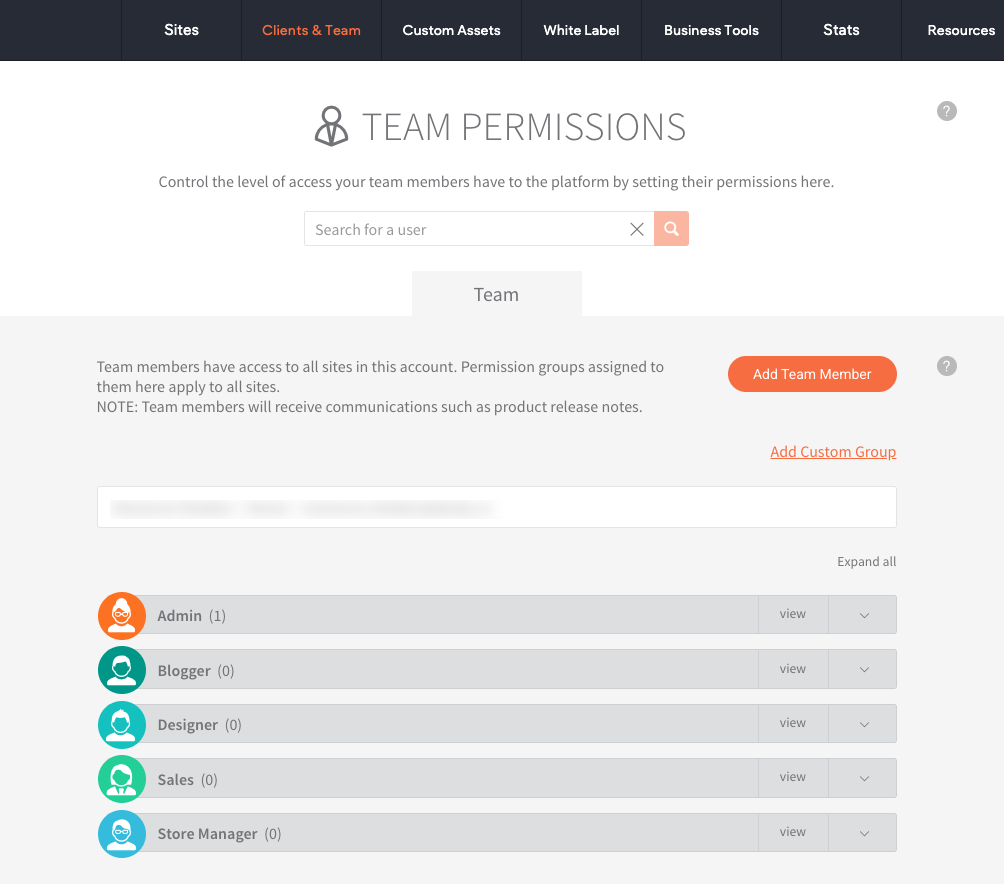
Team Permissions page
To manage your team's permissions, go to:
Clients & Team > Team Permissions
Sensitive spaces in the platform
Okay! Let's review some of the more sensitive spots within Duda and the permission sets you can use to control a user's ability to use (or see) the features:
Users & Permissions Management
Possessing the power to control who has access to sites and the permissions of those individuals is a critical responsibility that should only be available to admins. Again, admins should follow the principles of Least Privilege and Need-to-Know in order to protect themselves and their clients.
To control access:
Team Permissions
- Manage Clients*
- Manage Team Members*
*By default, these permissions are only available within the Admin set of permissions.
Client Permissions
- Not available
Did you know?
When we're referring to the "Admin" or "Designer" roles, know that we're referring to the default set of roles and permissions found on the Team Permissions page. These presets are customizable and you can create your own custom roles with whatever permissions you choose.
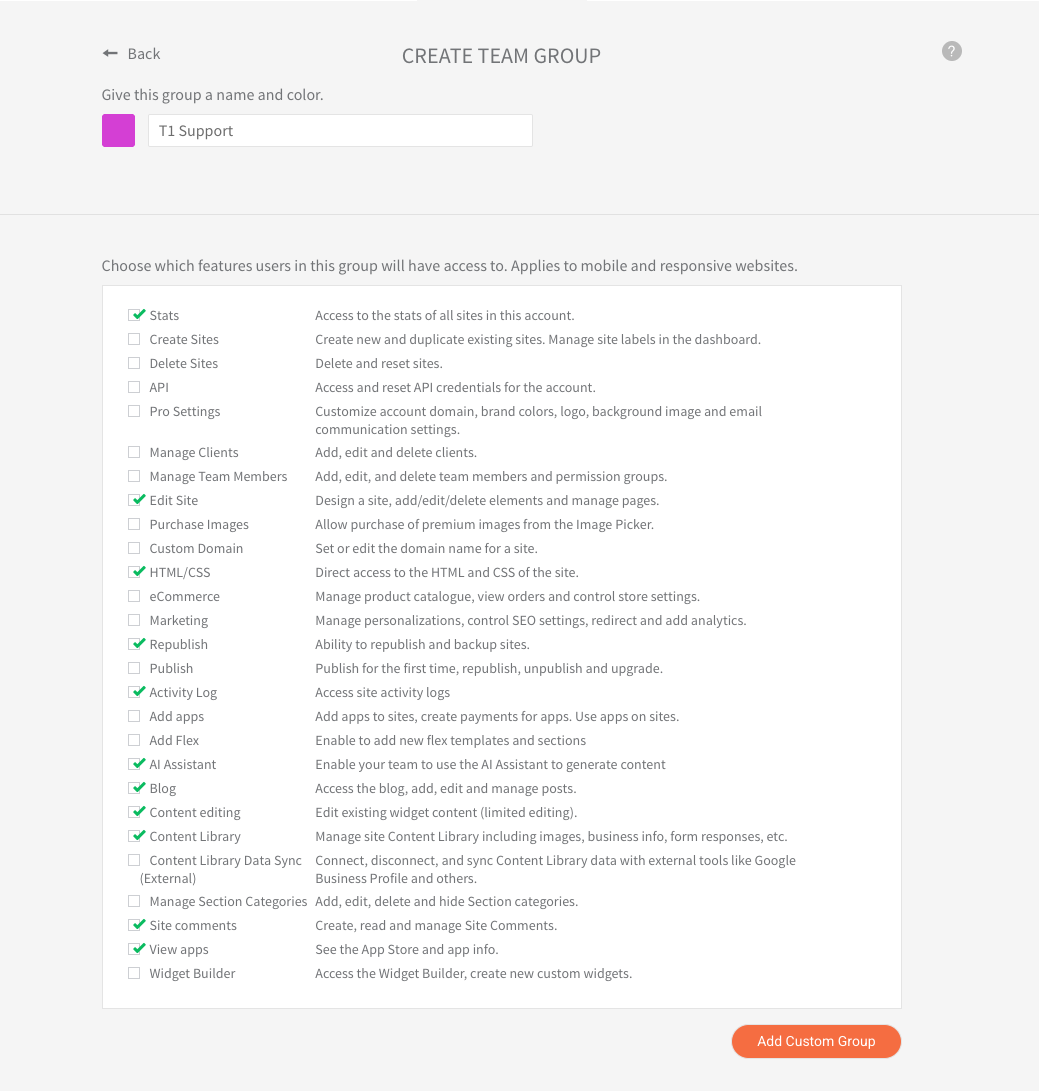
Account & Billing setup
The Payment tab within Client billing is only accessible to the account owner. This area contains sensitive billing information and should be protected to prevent unauthorized access.
To control access:
Team Permissions
- Pro Settings*
*By default, these permissions are only available within the Admin set of permissions.
Client Permissions
- Not available
Managing API access
Duda's powerful API can be used to control access, publishing, communications, and more. You do not want a bad actor gaining access to your API credentials. Granting who can and can't access (or reset) API credentials for your account is an admin-only privilege.
To control access:
Team Permissions
- API*
*By default, these permissions are only available within the Admin set of permissions.
Client Permissions
- Not available
Auditing (Activity log)
The activity log displays a record of the activities happening in your system including your team members and clients. This area should be protected and only visible to trusted individuals.
To control access:
Team Permissions
- Activity Log*
*By default, these permissions are only available within the Admin set of permissions.
Client Permissions
- Not available
Publishing sites
Given a site's publishing status has billing implications for your business, it's important to ensure that there's a strict process in place for determining who can publish sites.
To control access:
Team Permissions
- Publish
- Republish*
*The ability to republish a site is available within the Designer set of permissions by default.
Client Permissions
- Publish
- Republish
Contact form submissions
The contact form submission area may contain personally identifiable information (PII) such as email addresses, physical addresses, names, phone numbers, and other details submitted via contact forms. Duda cannot restrict access to these submissions, so it is critical to ensure that only authorized users have access to this information.
To control access:
Team Permissions
- Content Library*
*This permission is available within the Designer set of permissions by default.
Client Permissions
- Content Library
Manage members in members-only pages
Pages restricted to members-only may contain sensitive data that requires secure handling. These pages are intended for authorized users only, and any data they contain should be treated with the utmost care.
To control access:
Team Permissions
- Content Editing*
*This permission is available within the Designer set of permissions by default.
Client Permissions
- Content Editing
eCommerce
Both Duda’s Native eCommerce and Third Party Store solutions handle customer orders, which can include sensitive data like payment details and customer addresses. While Duda doesn't collect an extensive amount of sensitive information, it's still important to handle this area with care and ensure secure access for those who need it.
To control access:
Team Permissions
- eCommerce*
*This permission is available within the Designer and Store Manager set of permissions by default.
Client Permissions
- eCommerce
Security for third-party integrations, Apps, & custom code
There are ways several ways to extend a website's capabilities beyond what Duda offers natively. These areas also require special attention to ensure secure use. Let's review each one:
Apps in Duda's App Store
Many apps available in Duda’s App Store may also collect sensitive data. For example, Paperform can collect sensitive information. While Duda manages security for the platform itself, be aware of how these third-party apps handle data and ensure your team and your clients are using them securely.
To control access:
Team Permissions
- Add apps
- View apps*
*This permission is available within the Designer set of permissions by default.
Client Permissions
- Use apps
- Manage free apps
Third-party integrations
Duda offers the ability to integrate with third-party solutions. Any user who can access the site can customize 3rd-party integrations.
If those integrations transfer data to 3rd-party systems, it is the user's responsibility to manage access to those systems.
For example, if you use Zapier to push data to Google Sheets, it it your responsibility to manage those integrations and ensure that any data shared with third parties is also handled properly.
To control access:
Team Permissions
- not applicable
Client Permissions
- not applicable
Use of custom code and code snippets
Duda also allows users to add custom code to websites. Custom code is great for extending the capabilities of your sites, but an introduce security risks— especially if someone is unfamiliar with the code they are adding to a site.
Make sure that any code added is secure, and that it does not expose the platform to vulnerabilities. Always review and test custom code thoroughly before deploying it.
To control access:
Team Permissions
- HTML/CSS
*This permission is available within the Designer set of permissions by default.
Client Permissions
- Developer Mode
Bottom line
Be aware that part of your security responsibility is to:
- understand the permission sets available to you
- use those permission sets to manage access to sensitive areas and features of the platform using the principles of Least Privilege and Need-to-Know
- take extra care with third-party integrations to ensure that they are properly secured
- manage custom code carefully and always prioritize security when adding or editing code on the platform
By following these best practices, you can help protect sensitive information and maintain a secure Duda environment.
Next up, we've got one more facet of security for you to manage for your account:
privacy management.