
/PREPARE to build your SELF-SERVICE FLOW
Triggering automated site creation
Let’s start with an important question:
Who initiates the creation of a new client site in your account?
For a typical self-service flow (i.e., DIY flow), the answer is going to be:
your clients.
The site creation request is typically triggered by an action taken by your client. Maybe they click a button or fill out a form. Or they're presented with your website offer's pricing & packaging options (self-service, full-service, etc.).
Once that action is taken, there's more that occurs between the site initiation and the site creation (typically
template selection—we'll talk about that next!) but that initial action sets the user down the site creation path. Using the API, you can trigger the creation of a new site for that user and drop them into Duda’s editor (white labeled with your branding!) where they can start managing their site.
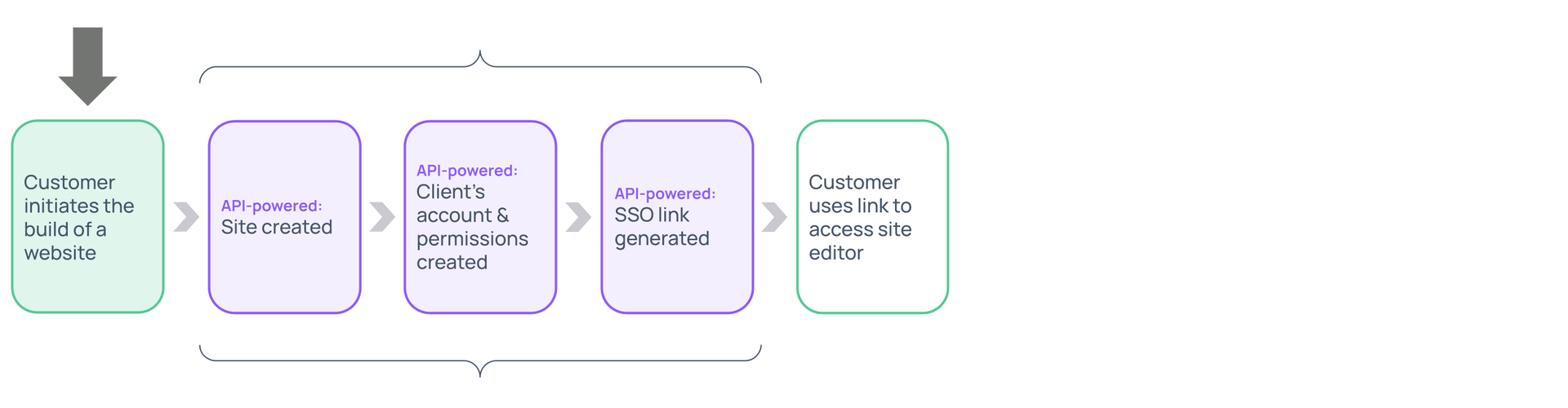
Knowing this, the next step is to think about
how
and where your clients will initiate the creation of their site.
Many of Duda’s SaaS customers trigger the site creation process from a button that the user clicks. Often this button gets added somewhere within your existing platform/application where your clients can see it. If this applies to you, you’ll want to think about:
How would you like your customers to initiate the creation of their site?
If your flagship product includes a dashboard or profile page, you could add a call to action button there.
You’ll also want to think about the
who:
Are you planning to offer sites to all of your users or only a subset of your users?
If so, how will you make this visible to only that subset?
Reminder
The fact that clients — and not your employees— are the ones triggering the automation is a defining characteristic of a self-service flow (also known as a 'DIY' flow).
If you want your
employees to trigger the automation, no problem. That can be done as well. If this sounds closer to what you had in mind, no problem! You might be looking at building a full-service offer, or hybrid offer. Be sure to connect with your Account Manager to discuss your vision.
MAKE A PLAN
Capture your thoughts
Capture your thoughts
Great! We'll hang onto this info and add it to the report we'll share with you at the end of the course.
Oops, there was an error sending your message.
Please contact us at university@duda.co for assistance.