
Congratulations! 🎉
/Automate site creation with zapier
Well done! You've successfully automated site creation with Zapier, Paperform, and Duda. You've learned valuable skills that will save you time and streamline your web design workflow—giving you more time to focus on growing your business and delighting your clients.
Here’s a quick recap of what you’ve accomplished:
- Built a site template that will be used to generate all your client sites with ease.
- Created an intake form using Paperform to capture client data and automatically populate your site template.
- Built the automation in Zapier, mapping form data to Duda’s content library to automate the entire site creation process.
- Configured the automation to send an email to the inbox of your choosing
- Tested and published your automation
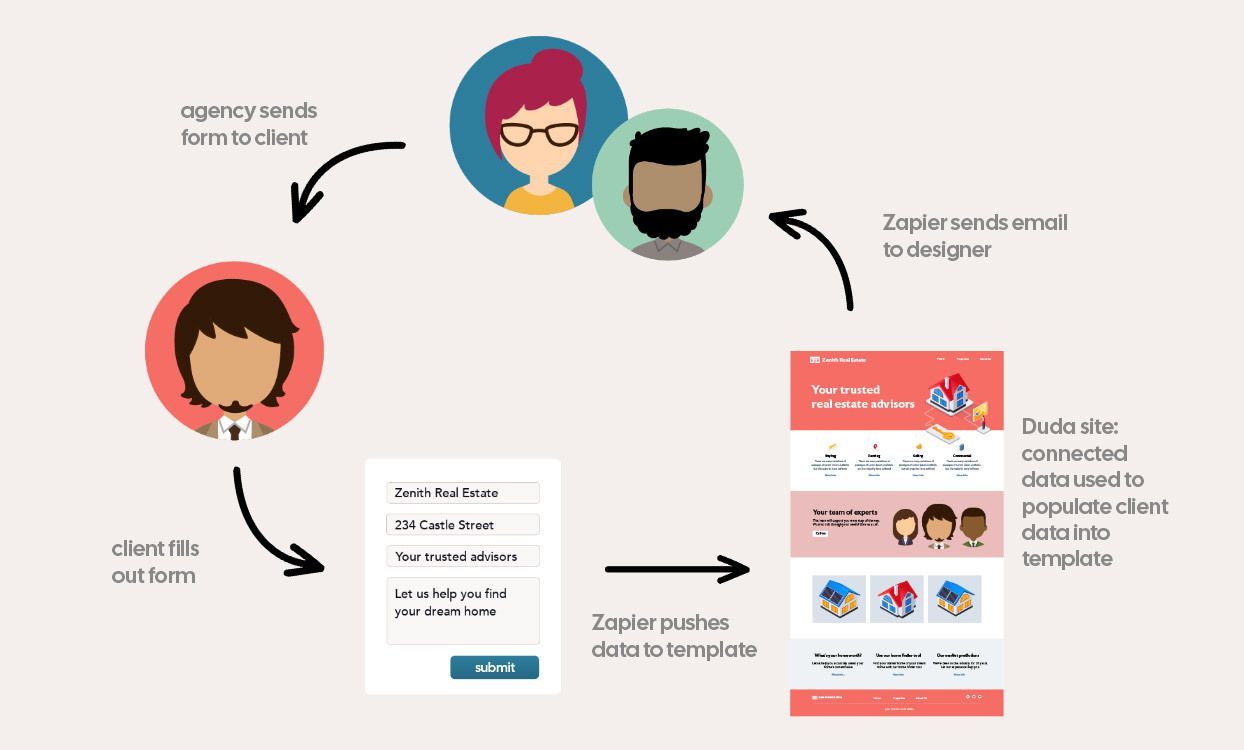
By automating your workflows, you’ve unlocked the potential to run your web design operations more efficiently, reduce errors, and enhance your client's onboarding experience.
But don’t stop here—Part 2 is coming soon! We’ll be introducing more advanced steps to make your automation even more powerful and complete, helping you take your workflow to the next level.
We can't wait to see what you build next 🧡
Ready for more? Try these!

[video]
Automate blog post creation with Zapier + ChatGPT
Set up a workflow that generates blog content automatically from form submissions.

[video]
Automate client creation with Zapier
Learn how to use Duda's Create Clients Zapier action to automatically create clients and assign permissions to new sites.
[course]
Dynamic pages and collections
Create multiple pages based on a single design using content stored in collections.