/MEET EDITOR 2.0

Widget types

To help you quickly find what you need, widgets are grouped into categories.

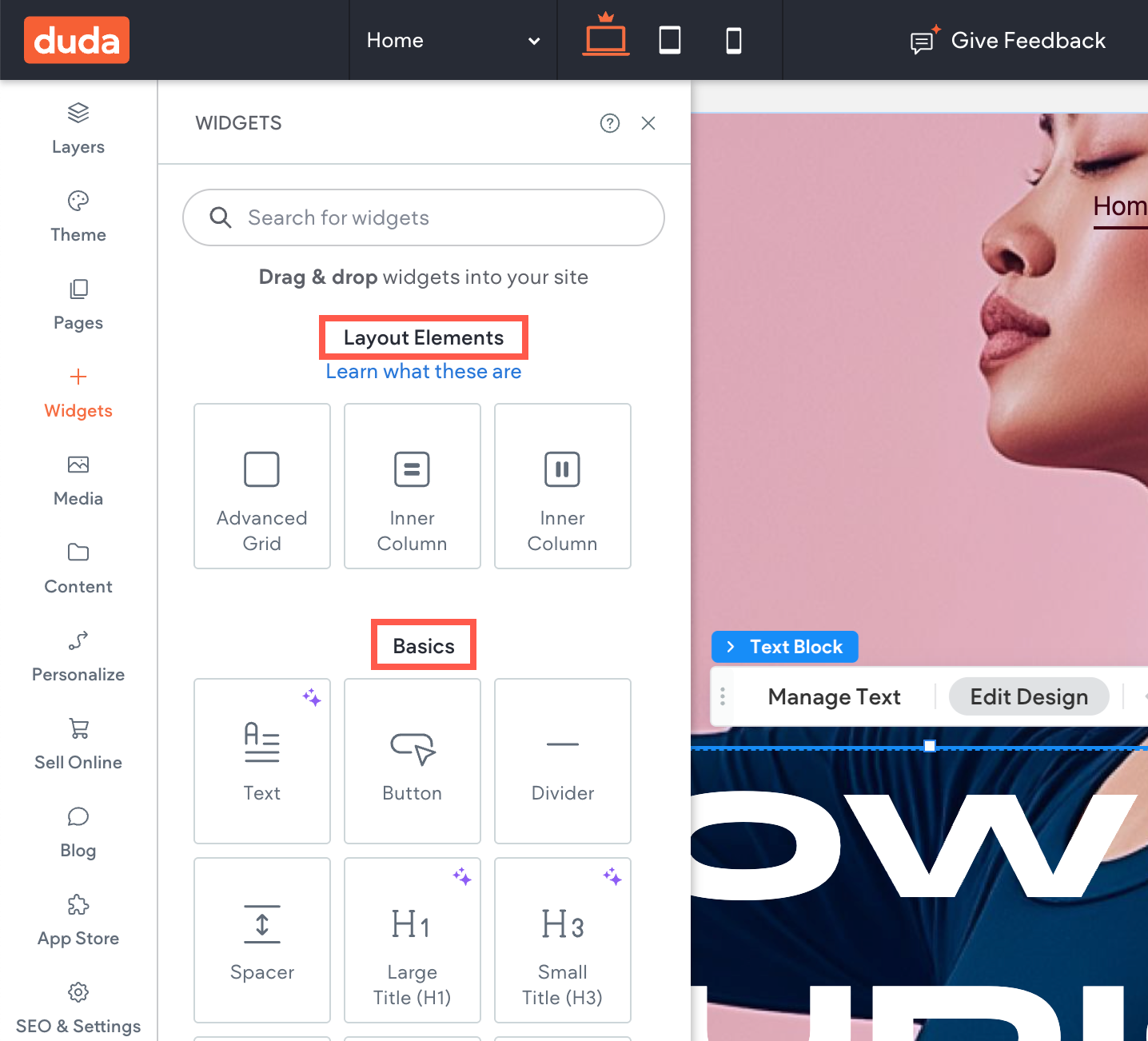
Layout Element widgets are essential for structuring your page, allowing you to arrange and organize content. Use layout elements to build the overall framework of your page before adding specific content.


Inner Columns: These are widgets you can add within columns to further divide content either vertically or horizontally. Inner columns can be nested within other inner columns to create complex layouts.


Advanced Grid: This widget can be added within columns or inner columns to offer a flexible grid system for precise control over the placement and alignment of elements.


Basics widgets provide essential content elements, including text, buttons, dividers, and more. Use basic widgets for straightforward content and key features like headings, lists, and countdowns.

Media widgets allow you to incorporate rich content like videos and galleries into your site. Use media widgets to make your site more dynamic and engaging, particularly for product showcases or tutorials.

Business widgets add functionality to support business operations, such as e-commerce and communication. Use business widgets to make it easier for visitors to interact with your business and access essential services.

Social widgets help integrate your site with social media platforms, encouraging user interaction. Use social widgets to connect with users on social media and promote content sharing.

Advanced widgets offer specialized functionality for more complex site features. Use advanced widgets when you need to go beyond standard features, such as adding custom code.

Blog widgets are designed to help you display and manage blog content on your website. Use blog widgets to effectively showcase your blog content, encourage visitor engagement, and improve content discoverability.

Store widgets are specifically tailored for e-commerce functionality, allowing you to build and manage an online store. Use store widgets to create a seamless shopping experience, making it easy for visitors to find, view, and purchase products.

  • Layout Element

    Layout Element widgets are essential for structuring your page, allowing you to arrange and organize content. Use layout elements to build the overall framework of your page before adding specific content.


    • Inner Columns: These are widgets you can add within columns to further divide content either vertically or horizontally. Inner columns can be nested within other inner columns to create complex layouts.


    • Advanced Grid: This widget can be added within columns or inner columns to offer a flexible grid system for precise control over the placement and alignment of elements.

  • Basics

    Basics widgets provide essential content elements, including text, buttons, dividers, and more. Use basic widgets for straightforward content and key features like headings, lists, and countdowns.

  • Media

    Media widgets allow you to incorporate rich content like videos and galleries into your site. Use media widgets to make your site more dynamic and engaging, particularly for product showcases or tutorials.

  • Business

    Business widgets add functionality to support business operations, such as e-commerce and communication. Use business widgets to make it easier for visitors to interact with your business and access essential services.

  • Social

    Social widgets help integrate your site with social media platforms, encouraging user interaction. Use social widgets to connect with users on social media and promote content sharing.

  • Advanced

    Advanced widgets offer specialized functionality for more complex site features. Use advanced widgets when you need to go beyond standard features, such as adding custom code.

  • Blog

    Blog widgets are designed to help you display and manage blog content on your website. Use blog widgets to effectively showcase your blog content, encourage visitor engagement, and improve content discoverability.

  • Store

    Store widgets are specifically tailored for e-commerce functionality, allowing you to build and manage an online store. Use store widgets to create a seamless shopping experience, making it easy for visitors to find, view, and purchase products.

Widget categories

Note

For those needing advanced customization, the Widget Builder is a powerful tool for creating custom widgets tailored to your site’s unique requirements. It supports custom code, reusable components, and integration with external data sources. For details on getting started, see our Developer Documentation.