
/content mapping & automation
Let's revisit the Content Library
The Content Library is a centralized repository where all the content for a site—like text, images, business information, and other data—is stored in a structured format.
It holds data such as:
- Business Info: Core details like business name, address, phone number, and the option to enable Local Business Schema.
- Business Text: Custom text fields for things like taglines, descriptions, or “about” sections.
- Business Images: Logos, hero images, team photos, etc.
- Collections: Structured, repeatable data sets—like a list of services, team members, testimonials, or locations. These work like mini-databases that you can connect to dynamic pages or repeaters on a site.
This content is not “just on the page”—it’s managed separately in the background, which makes it incredibly powerful for connected templates and automation.
This is paragraph text. Click it or hit the Manage Text button to change the font, color, size, format, and more. To set up site-wide paragraph and title styles, go to Site Theme.
The Content Library’s role in Connected Templates
The Content Library serves as the core engine behind dynamic site creation. It serves as the single source of truth—a centralized hub where all the site’s content is stored, organized, and updated.
Rather than adding content directly to each site element individually, the content is stored centrally in the Content Library and connected to the elements. This clear separation makes managing content more efficient and consistent, while allowing the design to stay flexible and easily reused across many different sites.
Why Single Source of Truth matters
The Content Library being the single source of truth means:
- You don’t store content in multiple places—just in the library.
- All connected elements across the site pull from this one central version of the data.
- If you update the value in the library (say, you change the phone number), that change is reflected instantly wherever that field is used—on the homepage, the contact page, or in the footer.
This keeps the site consistent, reduces errors, and simplifies content management—especially across large volumes of sites.
Field Mapping: How it works
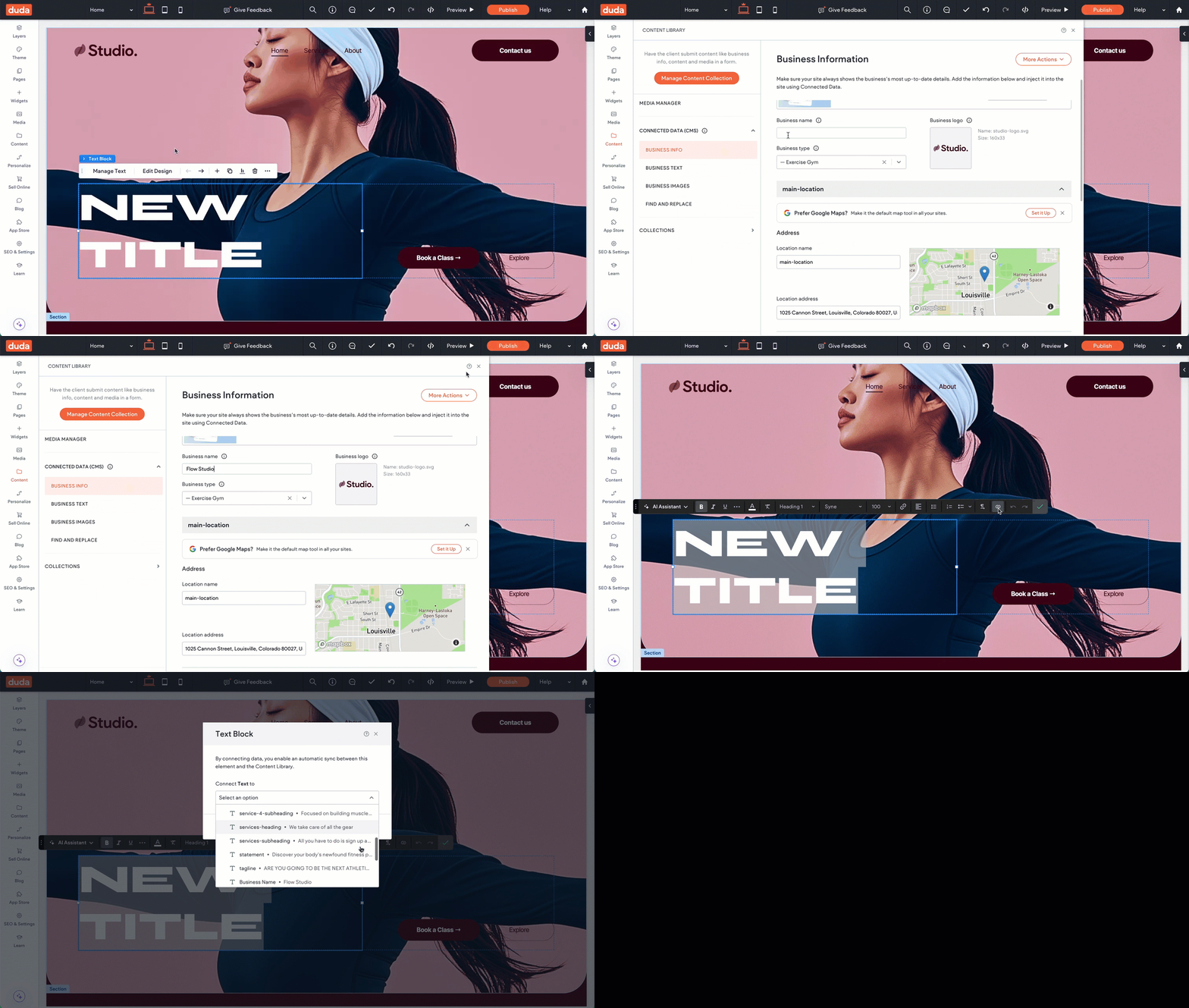
Every field in the Content Library (like business name, phone number, any business images and custom text fields) can be mapped to a specific widget or design element in your site template. This is what makes a template or site connected.
Here's what the process looks like:
Define or create fields in the Content Library and add placeholder data.
Connect those fields to widgets/elements on the site.
When the Content Library is populated (whether manually or via the API), those connected widgets and site elements automatically display the corresponding content.
Automated site generation
Once you’ve mapped your data fields to the Content Library, automating site creation becomes straightforward. When generating sites at scale, the Content Library acts as your target schema for content. You programmatically inject data into the specific fields in the library, and because your template is already connected to those fields, the site builds itself automatically.
This means the site is fully populated with content and laid out correctly, and all you need to do is style the template to match the client’s brand—no need to adjust the structure or content manually.
Here's how the process typically works:
Business information is collected from an intake form, CRM, or database.
That data is mapped to corresponding fields in the Content Library.
The template then pulls content from those fields and populates the site automatically.